
Introduction
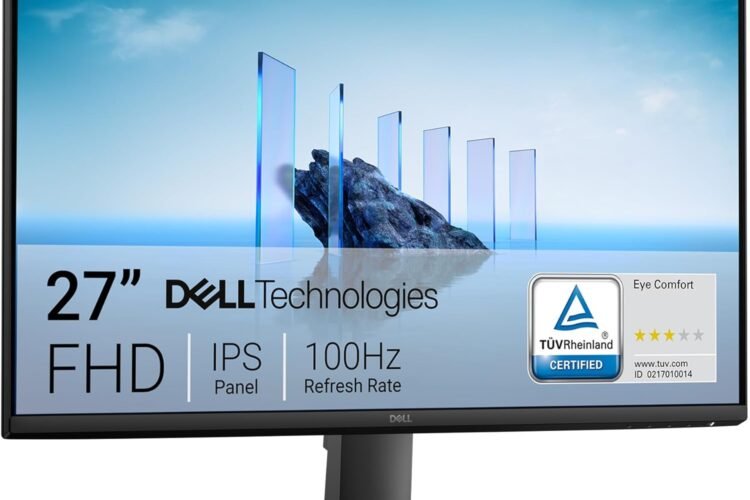
The Dell 27″ Full HD Monitor (SE2725HM) is a versatile display designed to strike a balance between comfort, everyday productivity, and smooth motion for casual gaming or video streaming. Its 27-inch IPS panel offers clear 1080p visuals and wide viewing angles, while a 100 Hz refresh rate helps deliver slightly smoother motion compared with conventional 60 Hz screens — making this monitor a good fit for work, studies, browsing, and lighter entertainment.
With thoughtful features like ComfortView Plus to minimize blue light exposure and a simple, clean design, this Dell monitor aims to enhance both productivity and viewing comfort for long hours at your desk.
Product Overview
🖥️ Display & Image Quality
• 27-inch Full HD (1920×1080) IPS panel delivers crisp visuals and accurate colors across a wide viewing angle.
• Anti-glare screen reduces reflections in bright environments for comfortable viewing.
⚡ Smooth Performance
• 100 Hz refresh rate provides smoother motion compared to standard 60 Hz panels, which can make gameplay, scrolling, and video playback feel more fluid.
👁️ Eye Comfort Technology
• ComfortView Plus helps reduce harmful blue light exposure without sacrificing color accuracy — beneficial for long work or study sessions.
• TÜV Rheinland certification supports reduced flicker and eye strain.
🔌 Connectivity
• Includes HDMI and VGA ports for connecting to laptops, desktops, and other video sources without needing adapters.
Design & Build Quality
The Dell SE2725HM sports a sleek, minimalist design with thin bezels and a compact footprint, making it a good match for home offices, dorm desks, or dual-monitor setups. Built-in cable management helps keep your workspace tidy, and the matte finish looks clean and professional.
The stand supports a basic tilt adjustment so you can find a comfortable viewing angle, and the monitor is VESA-mount compatible if you prefer to mount it on an arm or wall mount.
Performance & Daily Use
🔹 Work & Productivity: The 27-inch screen and Full HD resolution offer plenty of space for documents, spreadsheets, and web-based work. The wide IPS viewing angles ensure content remains clear from across the desk.
🔹 Casual Gaming & Media: The 100 Hz refresh rate gives a more responsive feel in games and smoother motion for movies and videos, though it’s not targeted at competitive gaming.
🔹 Comfort: Eye-care tech such as ComfortView Plus and anti-glare help reduce eye strain during extended sessions — whether you’re working, watching, or browsing.
This monitor pairs well with everyday PCs and laptops and provides a balanced experience for mixed use.
Pros & Cons
✔ Pros
✔ 100 Hz refresh rate — smoother motion than basic monitors.
✔ IPS panel — accurate color and wide viewing angles.
✔ ComfortView Plus — reduces blue light for more comfortable long-term use.
✔ Anti-glare screen — good for bright rooms and daylight viewing.
✔ Simple connectivity — works with a broad range of devices.
✘ Cons
✘ Full HD resolution is standard only — not as sharp as QHD or 4K screens.
✘ Limited stand adjustability — tilt only, not height or swivel.
Who This Monitor Is For
✔ Students and professionals who want a reliable, everyday monitor for work and study.
✔ Casual gamers who enjoy smooth motion at 100 Hz without investing in high-end gaming displays.
✔ Anyone seeking a comfortable screen for long hours in front of the computer.
Final Verdict
The Dell 27″ Full HD Monitor (SE2725HM) delivers a well-rounded experience for mixed use — combining a comfortable viewing experience with smooth motion and reliable image quality. With features like a 100 Hz refresh rate, ComfortView Plus, and an anti-glare IPS panel, it’s a versatile choice for everyday computing, movies, and light gaming. While it doesn’t offer high resolutions like QHD or 4K, its balanced set of features and ergonomic design make it a strong pick for work or home setups.
Frequently Asked Questions (FAQs)
Q1: What refresh rate does this Dell monitor support?
This monitor supports a 100 Hz refresh rate, which provides smoother motion in games and video compared with 60 Hz screens.
Q2: Is it good for gaming?
It’s well-suited for casual and light gaming, though competitive gamers may prefer higher refresh rates and resolutions.
Q3: What connectivity does it have?
It includes HDMI and VGA ports for straightforward connections to desktops and laptops.
Q4: Does it help reduce eye strain?
Yes — features like ComfortView Plus and anti-glare help reduce blue light exposure and glare, making it more comfortable for long sessions.
Q5: Can it be mounted on a wall?
Yes — it’s VESA-compatible, so you can use a monitor arm or wall mount if desired.
Would you like a comparison article showing how this Dell monitor stacks up against other budget 27″ gaming and productivity displays?