
Introduction
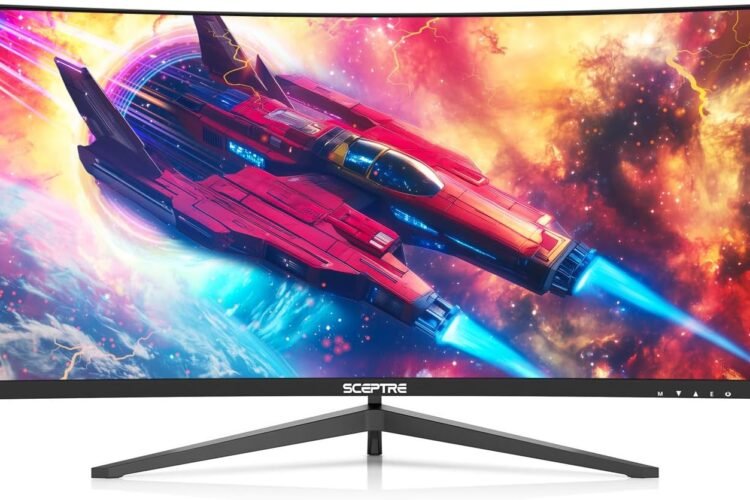
The Sceptre 30″ Ultrawide Curved Monitor (C305B-200UN) blends immersive widescreen visuals and fluid motion with features you’d expect from a higher-end gaming display — but at a budget-friendly price point. With a 2560×1080 ultrawide resolution, up to 200 Hz refresh rate, AMD FreeSync compatibility, and built-in speakers, this curved VA panel monitor aims to deliver both smooth gameplay and productive workspace in a single screen.
Its 21:9 aspect ratio and curved 1800R design wrap more content into your field of view, enhancing gaming immersion and giving you extra workspace for multitasking. This makes it a good choice for gamers, movie watchers, and users who want more screen real estate without moving to a multi-monitor setup.
Product Overview
🖥 Large Ultrawide Curved Display
• 30″ diagonal VA panel with an 1800R curve — draws you into games and widescreen content.
• 2560×1080 (UWHD) resolution offers a wide field of view while keeping graphics clear on this size.
⚡ Smooth Gaming Performance
• Up to 200 Hz refresh rate when connected via DisplayPort, giving very smooth motion — especially for competitive and fast-paced games.
• AMD FreeSync support reduces tearing and stuttering when paired with a compatible AMD graphics card.
🎮 Adaptive Modes & Game Settings
• Custom FPS and RTS presets optimize color and contrast depending on the game genre.
• Blue Light Shift and anti-flicker settings help reduce eye strain during extended play or work sessions.
🔊 Built-In Audio
• Integrated speakers offer basic audio for gaming, movies, and everyday use — good for casual use, though not as rich as dedicated external speakers.
🔌 Versatile Connectivity
• Supports DisplayPort (up to 200 Hz) and HDMI (up to 165 Hz depending on port), making it compatible with PCs, consoles, and laptops.
• 3.5 mm headphone jack allows connection to headphones or external sound systems.
Design & Build Quality
The monitor features a curved VA panel that enhances immersion and wraps visuals around your field of view. With a matte finish and slim bezels, it’s ideal for multi-window workflows and widescreen gaming. The stand allows basic tilt adjustment, and a VESA mount pattern lets you move to a desk arm for customized ergonomics.
While the overall build is functional and visually appealing for its price, users should manage expectations — more premium models with broader ergonomic stand adjustments or sturdier construction can feel more refined.
Performance & Daily Use
✔ Gaming: High refresh rate and FreeSync make action feel responsive and smooth — especially in fast titles. However, in very fast motion or dark scenes, a VA panel may show some ghosting or trailing artifacts due to pixel persistence at higher refresh settings.
✔ Multitasking & Productivity: The 21:9 aspect ratio provides extra horizontal space, making it easier to work with split windows, timelines, and spreadsheets.
✔ Movies & Streaming: Wide cinema-style content fills the screen with fewer black bars than traditional 16:9 displays.
Note: Some owners report that performance at the highest refresh rates (200 Hz) can exhibit ghosting or motion blur in darker scenes — switching to lower refresh rates like 144 Hz or 120 Hz may reduce this issue while still delivering smooth visuals.
Pros & Cons
✔ Pros
✔ Immersive ultrawide curved screen — excellent for gaming and movies.
✔ Up to 200 Hz refresh rate — very smooth motion in supported games.
✔ AMD FreeSync helps reduce screen tearing.
✔ Built-in speakers and headphone jack — easy basic audio setup.
✔ Multiple display inputs — versatile connections for consoles and PCs.
✘ Cons
✘ 2560×1080 resolution means vertical pixels are lower than 1440p ultrawides — some users prefer more vertical detail for productivity.
✘ VA panel ghosting can be noticeable in fast, dark scenes at highest refresh rates.
✘ Stand offers limited adjustment; desk arms or mounts may be needed for comfort.
✘ Built-in speakers are basic — not suited for high-quality audio needs.
Who This Monitor Is For
✔ Gamers who want ultrawide immersion and high refresh motion without breaking the bank.
✔ Users seeking a wide workspace for multitasking, spreadsheets, and creative apps.
✔ Streamers and movie watchers who enjoy widescreen formats.
✔ Casual users who like built-in speakers and versatile input options without external audio gear.
Final Verdict
The Sceptre 30″ Ultrawide Curved Monitor (C305B-200UN) offers a strong feature set for the price, combining ultrawide immersion, a high refresh rate, FreeSync support, and solid connectivity into a budget-friendly package. It’s particularly well-suited for gamers who want smooth motion and a broad field of view without paying premium prices.
While its resolution and VA panel characteristics aren’t perfect for every use case — especially if you need professional-grade color accuracy or frequently play games with fast dark scenes — this monitor delivers excellent value for gaming and everyday use.
Frequently Asked Questions (FAQs)
Q1: Does this monitor support high refresh rates?
Yes — it can reach up to 200 Hz via DisplayPort for very smooth gaming.
Q2: Will it reduce tearing in games?
It supports AMD FreeSync, which helps reduce screen tearing with compatible GPUs.
Q3: Can it be used with consoles?
Yes — HDMI ports support high refresh rates (up to 165 Hz depending on version), so it works with gaming consoles and PCs.
Q4: Is the built-in audio any good?
The built-in speakers are basic and suitable for casual use, but external speakers or headphones are recommended for richer sound.
Q5: Is the stand adjustable?
The stand offers only tilt adjustment — you may want a monitor arm for more ergonomic positioning.